Strimzi TLS Certificate Chaining with Enterprise PKI and Cert-Manager

Table of Contents
- 1. Introduction
- 2. Why Strimzi TLS Breaks with Enterprise PKI
- 3. High-Level Architecture Overview
- 4. Phase 1: Designing an Enterprise CA Hierarchy for Strimzi
- 5. Phase 2: Integrating FreeIPA with Kubernetes via Cert-Manager
- 6. Phase 3: Implementing Strimzi TLS Certificate Chaining
- 7. Phase 4: Deploying Kafka with Enterprise-Integrated TLS
- 8. Conclusion
Introduction
This guide walks through implementing Strimzi TLS certificate chaining using FreeIPA and cert-manager to integrate Kafka with enterprise PKI in Kubernetes.
Transport Layer Security (TLS) is foundational to securing communication in distributed systems. When running Apache Kafka on Kubernetes via Strimzi, TLS management becomes significantly more complex once external clients and enterprise certificate authorities (CAs) are introduced.
Strimzi provides TLS support out of the box, although as of this writing fully automated certificate chaining with external CAs is not supported. This becomes a problem when you want internal Kafka clients (Kubernetes Pods), external users, and cluster listeners to all trust the same certificate hierarchy.
This post walks through a practical, working solution that integrates FreeIPA, Cert-Manager, Strimzi, and Kafka to produce chained TLS certificates trusted across internal and external clients. While the approach is not fully automated, it demonstrates a reproducible pattern that works within Strimzi's current constraints.
The goal is to have a repeatable/automatable method that bypasses the limitations Strimzi currently has to offer.
Why Strimzi TLS Breaks with Enterprise PKI
At a high level, the problem is as follows:
- Kafka requires CA certificates in order to sign certificates of its listeners and internal clients, as well as to verify external clients wishing to communicate with Kafka listeners.
- Strimzi expects a specific CA structure and Kubernetes Secret format.
- FreeIPA generates enterprise-grade certificates but does not natively integrate with Strimzi.
- Cert-Manager bridges Kubernetes and external CAs, managing the automated rotation of CA certificates (but certificate chains must be handled carefully).
Strimzi currently assumes a single CA per role and does not automatically append intermediate certificates, meaning certificates issued externally will not be trusted unless the full chain is explicitly provided.
This post addresses this limitation by carefully constructing Kubernetes Secrets in a way that allows Kafka to accept the complete certificate chains and validate certificates issued by both internal and external authorities.
High Level Architecture Overview
The architecture integrates an existing enterprise certificate authority with a Kafka deployment managed by Strimzi in a Kubernetes environment. The primary goal is to maintain a clear and verifiable chain of trust while simplifying certificate issuance, management, and rotation within Kubernetes.
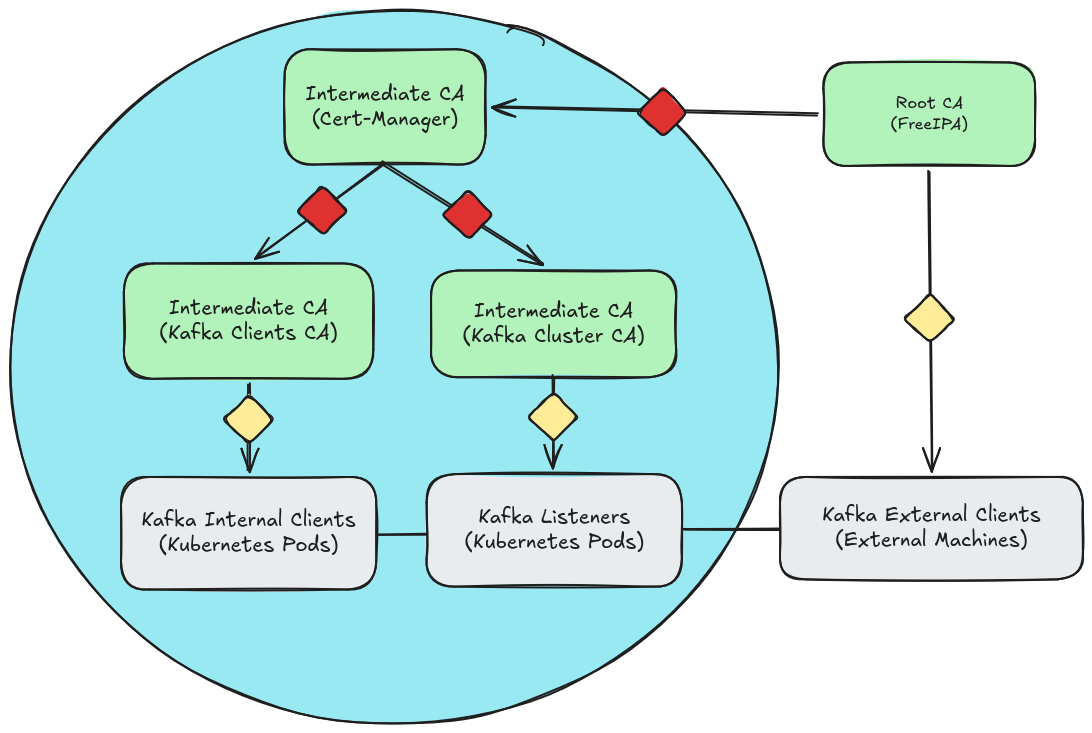
Fig. 1: Strimzi TLS certificate chaining architecture integrating FreeIPA and cert-manager.
The diagram represents:
- A kubernetes cluster, shown as the light blue circle.
- Certificate authorities, shown as light green boxes.
- Kafka clients and listeners, shown as light gray boxes.
- Certificates represented as diamonds, where red diamonds indicate intermediate certificates and yellow diamonds indicate leaf certificates.
- Directed arrows showing the flow of certificate signing, while solid lines between clients and listeners represent mutual TLS trust.
At the top of the trust hierarchy is the Root CA, hosted externally in FreeIPA. This root CA serves as the single source of trust and is responsible for issuing intermediate certificates. Rather than directly signing Kafka certificates, the Root CA delegates signing authority to a Kubernetes-managed intermediate CA via Cert-Manager.
Within the Kubernetes cluster, Cert-Manager issues and manages two additional intermediate certificate authorities: one dedicated to Kafka cluster components (brokers and listeners), and another dedicated to Kafka clients. These intermediates are used to issue leaf certificates to their respective workloads, ensuring that each component participates in mutual TLS using certificates derived from the same trusted root.
This structure allows both internal Kubernetes-based clients and external Kafka clients to establish trust with Kafka brokers while preserving a clear separation of responsibilities and minimizing direct exposure of the Root CA.
Phase 2: Integrating FreeIPA with Kubernetes via Cert-Manager
Phase 1 established the certificate authority hierarchy and prepared FreeIPA to delegate the intermediate certificate authority to Kubernetes. However, at this stage, no trust relationship exists between the Kubernetes cluster and the enterprise PKI. The Cert-Manager Intermediate CA profile has been created in FreeIPA, but Kubernetes has not yet received a signed intermediate certificate.
The goal of Phase 2 is to transfer the delegated certificate authority into the cluster in a controlled manner. This involves:
- Installing Cert-Manager into the Kubernetes cluster
- Generating a CSR for the Cert-Manager CA and having FreeIPA sign it
- Importing the certificates into Kubernetes via a Secret object
- Configuring a Cert-Manager Issuer object backed by the delegated Intermediate CA
By the end of this phase, Kubernetes will hold a FreeIPA-trusted Intermediate CA and will be capable of issuing subordinate certificates without further interaction with the Root CA.
Installing Cert-Manager
Cert-Manager introduces a Kubernetes-native certificate lifecycle controller. It automates certificate issuance, renewal, and rotation within the cluster. However, immediately after installation, it has no knowledge of or trust relationship with FreeIPA.
It must be explicitly configured with delegated certificate authority before it can issue certificates anchored to the enterprise Root CA.
helm repo add cert-manager https://charts.jetstack.io
"cert-manager" has been added to your repositories
helm install cert-manager cert-manager/cert-manager \
  --set crds.enabled=true -n cert-manager --create-namespace
NAME: cert-manager
LAST DEPLOYED: Thu Jan 1 00:00:00 1970
NAMESPACE: cert-manager
STATUS: deployed
REVISION: 1
TEST SUITE: None
NOTES:
...
Requesting the Cert-Manager Intermediate CA Certificate
To delegate a certificate authority to Kubernetes, we must request an intermediate CA certificate from FreeIPA using the service identity created in Phase 1. This process involves generating a CSR that requests CA capabilities and submitting it to FreeIPA using the custom certificate profile configured earlier.
The resulting certificate will:
- Be signed by the FreeIPA Root CA
- Be authorized to sign subordinate CA certificates
- Represent delegated certificate authority within Kubernetes
ipa-getcert request -I CertManagerCACSR       \
  --certfile=cert-manager.crt                 \
  --keyfile=cert-manager.key                  \
  --ca-file=ca.crt                            \
  --principal=KUBERNETES/CertManagerCAService \
  --profile=CertManagerCACert                 \
  --subject-name="CN = CertManagerCAService"  \
  --dns="CertManagerCAService"                \
  --issuer=ipa                                \
  --key-size=4096
New signing request "CertManagerCACSR" added.
Once approved and issued by FreeIPA, the resulting certificate cert-manager.crt represents delegated authority from the Root CA to the Cert-Manager Intermediate CA. Kubernetes will now be able to issue subordinate certificates trusted by enterprise systems.
Importing the Certificate into Kubernetes
The signed intermediate CA certificate and private key must now be securely introduced into the cluster. In Kubernetes, Cert-Manager references certificate authority material through Secrets. We create a TLS Secret containing:
- The delegated Intermediate CA certificate
- The corresponding private key
- The Root CA certificate
The Root CA is added to Cert-Manager certificate authority so that all Certificates (Secrets) issued from Cert-Manager will include the full chain of trust.
kubectl create namespace kafka
namespace/kafka created
kubectl create secret generic cert-manager-ca-kafka --namespace kafka \
  --from-file=tls.crt=cert-manager.crt                                \
  --from-file=tls.key=cert-manager.key                                \
  --from-file=ca.crt=ca.crt
secret/cert-manager-ca-kafka created
Creating a Cert-Manager Issuer
An Issuer defines how Cert-Manager signs certificates. In this case, we configure a CA-based Issuer that references the delegated Intermediate CA stored in the Kubernetes Secret applied in the previous step. Cert-Manager offers Issuer and ClusterIssuer objects. Issuer objects are Namespace-scoped whereas ClusterIssuers are cluster-scoped. Using an Issuer object follows best practices for multi-tenancy.
Execute the kubectl apply -f <filename> command to deploy the Issuer object.
---
apiVersion: cert-manager.io/v1
kind: Issuer
metadata:
  name: cert-manager-ca-kafka
  namespace: kafka
spec:
  ca:
    secretName: cert-manager-ca-kafka
Phase 2 Summary
By the end of this phase:
- Cert-Manager is installed in Kubernetes
- A delegated Intermediate CA certificate has been issued by FreeIPA
- The certificate and private key are securely stored in Kubernetes
- A CA-based Issuer is configured and ready to sign subordinate certificates
Kubernetes can now issue certificate authorities trusted by FreeIPA's Root CA.
Phase 3: Implementing Strimzi TLS Certificate Chaining
Phase 2 successfully delegated the intermediate certificate authority into Kubernetes. Cert-Manager now holds an Intermediate CA trusted by FreeIPA's Root CA. However, Strimzi does not directly consume that intermediate certificate. Instead, it expects its own certificate authorities for Kafka brokers and clients.
The goal of Phase 3 is to use the delegated Cert-Manager Intermediate CA to issue two subordinate certificate authorities required by Strimzi:
- Kafka Cluster CA (for brokers and listeners)
- Kafka Clients CA (for internal and external clients)
These subordinate CAs must be properly chained so that all certificates ultimately anchor back to the FreeIPA Root CA. By the end of this phase, Kafka certificates issued by Strimzi will be trusted by systems that trust the FreeIPA Root CA.
Why Strimzi Requires Separate Certificate Authorities
Strimzi manages TLS for:
- Broker-to-broker communication
- Client-to-broker communication
- External listener endpoints
To isolate trust domains and enable independent rotation, Strimzi requires:
- A Cluster CA
- A Clients CA
Rather than allowing Strimzi to self-generate these CAs, we instead instruct Cert-Manager to issue them using the delegated Intermediate CA created in Phase 2. This preserves enterprise trust alignment while maintaining Kubernetes-native lifecycle management.
Generating the Kafka Cluster CA Template
We first create a Certificate resource instructing Cert-Manager to generate a CA certificate signed by the Cert-Manager Intermediate CA.
---
apiVersion: cert-manager.io/v1
kind: Certificate
metadata:
  name: kafka-cluster-ca-template
  namespace: kafka
spec:
  isCA: true
  commonName: cluster-ca
  dnsNames:
    - cluster-ca
  secretName: kafka-cluster-ca-template
  issuerRef:
    name: cert-manager-ca-kafka
    kind: Issuer
This instructs Cert-Manager to:
- Generate a private key
- Create a CA certificate
- Sign it using the delegated Intermediate CA
- Store the result in a Kubernetes Secret
Generating the Kafka Clients CA Template
The process is repeated for Kafka clients CA.
---
apiVersion: cert-manager.io/v1
kind: Certificate
metadata:
  name: kafka-clients-ca-template
  namespace: kafka
spec:
  isCA: true
  commonName: clients-ca
  dnsNames:
    - clients-ca
  secretName: kafka-clients-ca-template
  issuerRef:
    name: cert-manager-ca-kafka
    kind: Issuer
At this stage, two subordinate CA certificate "templates" now exist as Secrets in the kafka namespace:
- kafka-clients-ca-template
- kafka-cluster-ca-template
Installing Strimzi
Strimzi is a Kubernetes-native controller capable of managing Kafka clusters. Some perks include:
- Creating CRDs for Kafka objects within Kubernetes simplifying configuration and management of Kafka clusters
- Providing "Kubernetes-aware" capabilities not implemented into Kafka by default
Kafka can now be treated as any other object in the Kubernetes ecosystem.
helm install strimzi-kafka-operator oci://quay.io/strimzi-helm/strimzi-kafka-operator \
  -n strimzi --create-namespace -set watchNamespaces={kafka}
Pulled: quay.io/strimzi-helm/strimzi-kafka-operator:0.50.1
Digest: sha256:2bbfeadd709eba82b2dc50b0b1c653b5ea7a2a379cf0df4f72e84b7b9060908a
NAME: strimzi-kafka-operator
LAST DEPLOYED: Thu Jan  1 00:00:00 1971
NAMESPACE: strimzi
STATUS: deployed
REVISION: 1
TEST SUITE: None
NOTES:
...
Handling Kafka Clients CA Secret (The Subtle Requirement That Makes This Work)
When Cert-Manager issues the Kafka Clients CA certificate, the resulting Secret contains a full certificate chain, with ca.crt containing the Root CA and tls.crt containing the two intermediate CAs:
- Kafka Clients CA
- Cert-Manager Intermediate CA
- FreeIPA Root CA
From a TLS perspective, this is correct.
However, Strimzi does not simply ingest a concatenated chain and infer structure. It expects certificate authorities to be separated into distinct entries inside the Secret. If the entire chain is placed into a single ca.crt entry, Kafka will not correctly parse the chain of trust. The chain must be split and encoded as unique fields within the Secret.
Extract and decode the base64 encoded certificates from the clients Secret template and concatenate them to a single file.
kubectl get secret kafka-clients-ca-template \
  -n kafka \
  -o jsonpath='{.data.tls\.crt}' | base64 -d > kafka-clients.crt
kubectl get secret kafka-clients-ca-template \
  -n kafka \
  -o jsonpath='{.data.ca\.crt}' | base64 -d >> kafka-clients.crt
Extract and decode the clients CA key to a separate file.
kubectl get secret kafka-clients-ca-template \
  -n kafka \
  -o jsonpath='{.data.tls\.key}' | base64 -d > kafka-clients.key
Iterate over the full certificate chain and generate individual files for each certificate (cert-1.crt, cert-2.crt...).
awk '
BEGIN {c=0}
/-----BEGIN CERTIFICATE-----/ {c++}
{ print > "cert-" c ".crt" }
' kafka-clients.crt
Perform a sanity check to ensure the three certificates contain the expected values. You should expect to see all three CA certificates:
- Kafka Clients CA
- Cert-Manager CA
- Root CA
for f in cert-*.crt; do
  echo "==== $f ===="
  openssl x509 -in $f -noout -subject -issuer
done
Base64 encode the certificates in preparation for creating the Kubernetes Secret.
base64 -w0 cert-1.crt > cert-1.crt.b64
base64 -w0 cert-2.crt > cert-2.crt.b64
base64 -w0 cert-3.crt > cert-3.crt.b64
base64 -w0 kafka-clients.key > kafka-clients.key.b64
Create the Kafka clients CA Secrets with the labels and annotations in order for Strimzi to recognize the Secrets as CA certificates for Kafka.
---
apiVersion: v1
kind: Secret
metadata:
  name: kafka-clients-ca-cert
  namespace: kafka
  labels:
    strimzi.io/kind: Kafka
    strimzi.io/cluster: kafka
  annotations:
    strimzi.io/ca-cert-generation: "0"
data:
  ca.crt: <contents from cert-1.crt.b64>
  ca-2.crt: <contents from cert-2.crt.b64>
  ca-3.crt: <contents from cert-3.crt.b64>

---
apiVersion: v1
kind: Secret
metadata:
  name: kafka-clients-ca
  namespace: kafka
  labels:
    strimzi.io/kind: Kafka
    strimzi.io/cluster: kafka
  annotations:
    strimzi.io/ca-key-generation: "0"
data:
  ca.key: <contents from kafka-clients.key.b64>
Handling Kafka Cluster CA Secret
The Kafka cluster CA is simpler than the Kafka clients CA. As opposed to parsing each certificate into individual fields we will be injecting the full certificate chain into the ca.crt field of the Secret.
kubectl get secret kafka-cluster-ca-template \
  -n kafka \
  -o jsonpath='{.data.tls\.crt}' | base64 -d > kafka-cluster.crt
kubectl get secret kafka-cluster-ca-template \
  -n kafka \
  -o jsonpath='{.data.ca\.crt}' | base64 -d >> kafka-cluster.crt
Extract and decode the cluster CA key to a separate file.
kubectl get secret kafka-cluster-ca-template \
  -n kafka \
  -o jsonpath='{.data.tls\.key}' | base64 -d > kafka-cluster.key
Base64 encode the certificates in preparation for creating the Kubernetes Secret.
base64 -w0 kafka-cluster.crt > kafka-cluster.crt.b64
base64 -w0 kafka-cluster.key > kafka-cluster.key.b64
Create the Kafka cluster CA Secrets with the labels and annotations in order for Strimzi to recognize the Secrets as CA certificates for Kafka.
---
apiVersion: v1
kind: Secret
metadata:
  name: kafka-cluster-ca-cert
  namespace: kafka
  labels:
    strimzi.io/kind: Kafka
    strimzi.io/cluster: kafka
  annotations:
    strimzi.io/ca-cert-generation: "0"
data:
  ca.crt: <contents from kafka-cluster.crt.b64>

---
apiVersion: v1
kind: Secret
metadata:
  name: kafka-cluster-ca
  namespace: kafka
  labels:
    strimzi.io/kind: Kafka
    strimzi.io/cluster: kafka
  annotations:
    strimzi.io/ca-key-generation: "0"
data:
  ca.key: <contents from kafka-cluster.key.b64>
Phase 3 Summary
By the end of this phase:
- Kafka Cluster and Client CAs are issued by Cert-Manager
- Strimzi broker TLS is anchored to FreeIPA via delegated intermediate
- All certificates chain back to the enterprise Root CA
- Certificate rotation remains Kubernetes-native
- Trust domains are intentionally separated
Kafka is now fully integrated into enterprise PKI while preserving operational boundaries between internal and external systems.
Phase 4: Deploying Kafka with Enterprise-Integrated TLS
At this stage:
- FreeIPA Root CA exists and remains isolated
- Cert-Manager holds a delegated Intermediate CA
- Kafka Cluster and Internal Clients CAs are issued by Cert-Manager
- Strimzi-compatible Secrets have been constructed
- External clients receive certificates directly from FreeIPA
The final Phase is deploying Kafka using Strimzi while instructing it to consume externally managed certificate authorities. This deployment does not generate any self-signed material. All certificate authority flows are already defined.
Defining the Kafka Resource
The Kafka custom resource defines:
- Broker replicas
- Listener configuration
- TLS settings
- External CA usage
- Client authentication
This example Kafka deployment generates internal listeners at port :9092 and external listeners at ports :31001-31003. Clients are expected to successfully connect to the listeners at this stage with external client certificates generated from FreeIPA and internal client certificates generated from the Kafka clients CA. The Kafka configuration demonstrates how to prevent Kafka from generating self-signed certificates.
---
apiVersion: kafka.strimzi.io/v1beta2
kind: Kafka
metadata:
  name: kafka
  namespace: kafka
spec:
  kafka:
    replicas: 3
    listeners:
      - name: internal
        port: 9092
        type: internal
        tls: true
        authentication:
          type: tls
      - name: external
        port: 9093
        type: nodeport
        tls: true
        authentication:
          type: tls
        configuration:
          bootstrap:
            nodePort: 31000
          brokers:
            - broker: 0
              nodePort: 31001
            - broker: 1
              nodePort: 31002
            - broker: 2
              nodePort: 31003
    authorization:
      type: simple
    config:
      offsets.topic.replication.factor: 3
      transaction.state.log.replication.factor: 3
      transaction.state.log.min.isr: 2
  zookeeper:
    replicas: 3
  clusterCa:
    generateCertificateAuthority: false
  clientsCa:
    generateCertificateAuthority: false
What This Configuration Ensures
These directives instruct Strimzi to:
- Use the externally provided CA Secrets
- Avoid generating self-signed CAs
- Respect the preconstructed trust hierarchy
Strimzi will:
- Issue broker certificates using the provided Cluster CA
- Validate internal clients using the provided Clients CA
- Trust external clients whose certificates chain to the FreeIPA Root CA
Verifying the Deployment
After applying the Kafka resource, you can verify the deployment using the following commands:
kubectl get pods -n kafka
kubectl describe kafka kafka -n kafka
Confirm the following:
- Broker certificates are signed by the Kafka Cluster CA
- The Cluster CA chains to the Cert-Manager Intermediate
- The Intermediate chains to the FreeIPA Root CA
Conclusion
Integrating Strimzi TLS certificate chaining with an enterprise PKI requires more than simply issuing certificates from an external authority. The critical detail is maintaining a clean and verifiable chain of trust while conforming to Strimzi's expectations around how CA material is structured inside Kubernetes secrets.
By delegating an intermediate CA from FreeIPA to Cert-Manager and then separating the resulting certificate chain into distinct entries within the Kafka clients CA secret, we preserve both enterprise trust requirements and Strimzi's operational assumptions. This separation is the subtle but essential step that allows Kafka to correctly load and validate the full chain.
The resulting architecture achieves:
- A root of trust anchored in enterprise PKI
- Automated certificate issuance and rotation via cert-manager
- Clear trust boundaries between cluster and client CAs
- Compatibility with Strimzi's TLS validation model
With this design in place, Kafka can operate within a fully enterprise-integrated TLS hierarchy without sacrificing automation, clarity, or operational safety.