This project is actively being developed.
The implementation currently covers:
- provisioning infrastructure with Terraform
- early automation of Linux From Scratch build stages
Future updates will expand into cross-toolchain automation, chroot builds, and bootable system generation.
Automating Linux from Scratch with Ansible and Terraform
Published Apr 06, 2026 • 18 min read

Table of Contents
- 1. Introduction
- 2. Why Automate Linux From Scratch
- 3. Architecture Overview
- 4. Phase 1: Provisioning Infrastructure with Terraform
- Infrastructure Flow
- Installing Terraform & Setting Up Environment
- Configuring Terraform Resources
- Provisioning Terraform Infrastructure
- 5. Phase 2: Configuring Ansible & LFS Prerequisites
Introduction
This guide documents an ongoing project focused on automating the Linux From Scratch (LFS) build process using Libvirt, Cloud-Init, Terraform, and Ansible. The primary objective is to create a fully reproducible virtual environment where an LFS system can be provisioned, configured, and built in clearly defined stages.
Rather than manually repeating the lengthy LFS workflow each time, this project uses infrastructure-as-code and configuration management principles to automate the process while preserving the educational value of the original LFS methodology.
The stack is intentionally divided into clear responsibilities:
- Libvirt provides the virtualization layer
- Cloud-Init performs first-boot guest initialization
- Terraform provisions infrastructure deterministically
- Ansible manages system configuration and LFS build stages
This separation of concerns keeps infrastructure provisioning independent from operating system configuration and allows each phase to be rerun safely.
The long-term goal is to make every major LFS phase restartable so users can rebuild, test, and experiment without repeating the full workflow.
Why Automate Linux From Scratch
Linux From Scratch is fundamentally a learning project designed to teach how a Linux system is assembled from source code, this project extends that philosophy by introducing modern DevOps and systems engineering tooling into the workflow.
Key benefits include:
- repeatable virtual machine provisioning
- deterministic infrastructure builds
- stage-based recovery and rebuild workflows
- reduced setup time for repeated experiments
- deeper understanding of Linux internals
One of the biggest advantages is the ability to resume from specific phases of the LFS build rather than restarting from the beginning. This is particularly valuable when testing package build steps, troubleshooting toolchain issues, or experimenting with different system configurations.
Architecture Overview
Before diving into the Terraform resources, it is useful to understand how the system is designed end-to-end.
This project follows a staged automation pipeline:
- Terraform provisions the virtual infrastructure
- Cloud-Init prepares the guest OS during first boot
- Ansible configures prerequisites and storage
- Ansible builds the LFS cross-toolchain
- Ansible builds temporary tools
- Ansible enters chroot and builds the final system
This staged design mirrors the official LFS workflow while making each phase reproducible and independently testable.
Component Responsibilities
Terraform
Terraform is responsible for infrastructure provisioning only.
This includes:
- storage pool creation
- base image download
- overlay disk creation
- dedicated LFS workspace disk
- cloud-init disk generation
- VM provisioning
Terraform’s job ends once the virtual machine is online.
Cloud-Init
Cloud-Init bridges infrastructure and configuration.
It prepares the VM on first boot by:
- creating the Ansible automation user
- injecting SSH public keys
- upgrading packages
- exposing disk metadata to the guest
This allows Ansible to connect immediately after provisioning.
Ansible
Ansible handles all operating system and LFS build logic.
This includes:
- disk formatting and mounting
- user and environment setup
- package installation
- toolchain compilation
- chroot orchestration
- final boot configuration
This design keeps each tool focused on its intended responsibility.
Phase 1: Provisioning Infrastructure with Terraform
With the architecture established, the first implementation phase focuses on infrastructure provisioning. The primary goal is to create an isolated, reproducible environment for Linux From Scratch that can be rebuilt quickly and consistently.
This project has been tested using the Rocky Linux Generic Cloud image as the base operating system. This section assumes the host operating system is Fedora-based and user has escalated privileges. If using another OS (i.e. Ubuntu), you can follow the steps to install Terraform here.
Infrastructure Flow
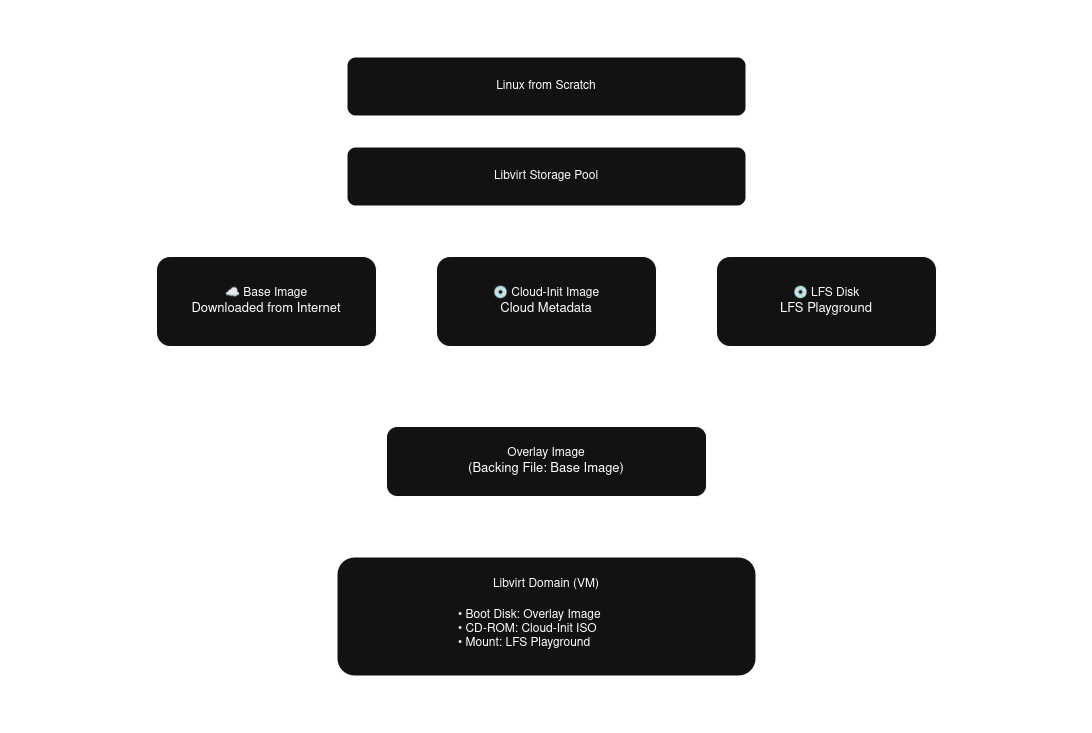
Fig. 1: Linux from Scratch Terraform resources dependency flowchart.
The infrastructure dependency chain follows this order:
- storage pool
- base cloud image
- overlay image
- dedicated LFS disk
- cloud-init disk
- virtual machine domain
This dependency graph is intentionally modeled in Terraform so resource creation remains deterministic. The storage pool must exist before any volumes are created. The overlay disk depends on the downloaded base image and stores only filesystem changes, allowing fast rebuilds and minimal storage overhead. The dedicated LFS disk is isolated from the operating system disk so the build workspace can be preserved or replaced independently. This is especially useful during iterative testing.
Installing Terraform & Setting Up Environment
Add the hashicorp repo and install Terraform.
sudo dnf install -y dnf-utils
...
Complete!
sudo yum-config-manager --add-repo https://rpm.releases.hashicorp.com/RHEL/hashicorp.repo
Adding repo from: https://rpm.releases.hashicorp.com/RHEL/hashicorp.repo
sudo dnf install -y terraform
...
Complete!
Install Virtualization packages and enable the libvirt daemon.
sudo dnf install -y qemu-kvm libvirt virt-install
...
Complete!
sudo systemctl enable --now libvirtd
Created symlink /etc/systemd/system/multi-user.target.wants/libvirtd.service → /usr/lib/systemd/system/libvirtd.service.
Created symlink /etc/systemd/system/sockets.target.wants/libvirtd.socket → /usr/lib/systemd/system/libvirtd.socket.
Created symlink /etc/systemd/system/sockets.target.wants/libvirtd-ro.socket → /usr/lib/systemd/system/libvirtd-ro.socket.
Created symlink /etc/systemd/system/sockets.target.wants/libvirtd-admin.socket → /usr/lib/systemd/system/libvirtd-admin.socket.
Generate SSH keys for the Ansible user. SSH keys will be used to grant Ansible passwordless access.
ssh-keygen -t ed25519 -C ansible -f ~/.ssh/linux-from-scratch -N ''
Generating public/private rsa key pair.
Your identification has been saved in /admin/.ssh/linux-from-scratch
Your public key has been saved in /admin/.ssh/linux-from-scratch.pub
...
Create Terraform files and configuration structure.
mkdir --parents ~/terraform/linux-from-scratch
touch ~/terraform/linux-from-scratch/{main,variables}.tf
touch ~/terraform/linux-from-scratch/terraform.tfvars
touch ~/terraform/linux-from-scratch/user-data.yml
Configuring Terraform Resources
Edit the variables.tf file, adding the following variables. The default values for VM resources (i.e. cpu, memory) are the recommended sizes based on the LFS Host System Hardware Requirements.
variable "libvirt_uri" {
  description = "Specifies connection to libvirt driver, defaults to local system."
  type        = string
  default     = "qemu:///system"
}

variable "pool_name" {
  description = "Name of libvirt storage pool to create for managing volumes."
  type        = string
  default     = "linux-from-scratch"
}

variable "pool_path" {
  description = "The storage pool path where the directory will be created."
  type        = string
  default     = "/var/lib/libvirt/images"
}

variable "ssh_public_key" {
  description = "SSH public key for passwordless connection to host post boot."
  type        = string
  default     = null
}

variable "base_image_name" {
  type       = string
  default    = "base"
}

variable "base_image" {
  description = "Location of image to base overlay image on, supports downloading via URL."
  type       = string
  default    = null
}

variable "overlay_image_name" {
  type       = string
  default    = "overlay"
}

variable "overlay_image_size" {
  description = "Size of overlay image (GiB)"
  type        = number
  default     = 20
}

variable "lfs_disk_name" {
  type        = string
  default     = "lfs"
}

variable "lfs_disk_size" {
  description = "Size of lfs disk (GiB)"
  type        = number
  default     = 30
}

variable "vm_name" {
  type        = string
  default     = "linux-from-scratch"
}

variable "vm_memory" {
  description = "Size of vm memory (GiB)"
  type        = number
  default     = 8
}

variable "vm_vcpu" {
  description = "Number of CPU cores"
  type        = number
  default     = 4
}

variable "vm_use_uefi" {
  description = "Boot via UEFI or BIOS, defaults to UEFI"
  type        = bool
  default     = true
}
Edit the terraform.tfvars file. Update the following variables based on how you would like your system configured, the ssh public key generated in the previous section (if you ran the provided ssh-keygen command you can view the key with this command cat ~/.ssh/linux-from-scratch.pub).
pool_name          = "linux-from-scratch"
base_image         = "https://dl.rockylinux.org/pub/rocky/10/images/x86_64/Rocky-10-GenericCloud-Base-10.1-20251116.0.x86_64.qcow2"
base_image_name    = "rocky10-base"
overlay_image_name = "rocky10-overlay"
ssh_public_key     = # Generated ssh public key
Edit the main.tf file with your preferred text editor. Libvirt provider dmacvicar/libvirt version 0.9.4 introduces many changes to previous versions. This version more closely maps to the xml data Libvirt uses to read and display data. The uri is set to be a variable for users who wish to change the uri connection to the hypervisor.
#############################################################
# PROVIDERS
#############################################################

terraform {
  required_providers {
    libvirt = {
      source = "dmacvicar/libvirt"
      version = "0.9.4"
    }
  }
}

provider "libvirt" {
  uri = var.libvirt_uri
}
To simplify resource definitions later in the configuration, a locals block is used to derive reusable values.
#############################################################
# LOCALS
#############################################################

locals {
  pool_path = "${var.pool_path}/${var.pool_name}"
  gb = 1024 * 1024 * 1024
}
Add storage resources. The overlay volume references the base image in the backing_image section referencing the base disk by id (this ensures the overlay disk will not be generated until the base image has been created).
#############################################################
# STORAGE POOL
#############################################################

resource "libvirt_pool" "lfs" {
  name   = var.pool_name
  type   = "dir"
  target = {
    path = local.pool_path
  }

  create = {
    build     = true
    start     = true
    autostart = true
  }
}

#############################################################
# OS DISK (BASE)
#############################################################

resource "libvirt_volume" "lfs_base" {
  name   = "${var.base_image_name}.qcow2"
  pool   = libvirt_pool.lfs.name
  target = {
    format = {
      type = "qcow2"
    }
  }

  create = {
    content = {
      url = var.base_image
    }
  }
}

#############################################################
# OS DISK (OVERLAY)
#############################################################

resource "libvirt_volume" "lfs_overlay" {
  name     = "${var.overlay_image_name}.qcow2"
  pool     = libvirt_pool.lfs.name
  capacity = var.overlay_image_size * local.gb
  target = {
    format = {
      type = "qcow2"
    }
  }

  backing_store = {
    path   = libvirt_volume.lfs_base.id
    format = {
      type = "qcow2"
    }
  }
}

#############################################################
# LFS DISK (LFS)
#############################################################

resource "libvirt_volume" "lfs" {
  name     = "${var.lfs_disk_name}.qcow2"
  pool     = libvirt_pool.lfs.name
  capacity = var.lfs_disk_size * local.gb
  target = {
    format = {
      type = "qcow2"
    }
  }
}
Add the Cloud-Init image and inject the variables into the user data file. SSH keys are passed and added to the Ansible user's trusted keys, and the LFS disk id is added to the facts dir for Ansible to gather later. The choice to hash the LFS key was used because device id's are limited to 20 characters. The key generated from the libvirt provider utilizes the disk path as the volume keys, meaning long paths could lead to duplicated id's. The solution is to provide a unique hash as the id that Ansible can then use to locate the device on the target system.
#############################################################
# CLOUD INIT
#############################################################

resource "libvirt_cloudinit_disk" "lfs_init" {
  name = "${var.vm_name}-init"

  user_data = templatefile("${path.module}/user-data.yml", {
    ssh_key = var.ssh_public_key
    lfs_disk = substr(sha256(libvirt_volume.lfs.key), 1, 20)
  })

  meta_data = yamlencode({
    instance-id    = var.vm_name
    local-hostname = var.vm_name
  })
}
The Libvirt domain below allows for limited user modification, including firmware. When booting via BIOS, if the domain does not have a video device attached it will wait indefinitely during Power-On Self-Test (POST) for the video device. The libvirt volumes are provided as a list of disks and referenced by id, this ensures that Terraform waits for the volumes to be created prior to provisioning the domain.
#############################################################
# VM
#############################################################

resource "libvirt_domain" "lfs_vm" {
  name        = var.vm_name
  memory      = var.vm_memory
  memory_unit = "GiB"
  vcpu        = var.vm_vcpu

  type      = "kvm"
  autostart = true
  running   = true

  os = {
    type         = "hvm"
    type_machine = "q35"
    firmware     = var.vm_use_uefi ? "efi" : null
    boot         = [{ dev = "hd" }]
  }

  cpu = {
    mode = "host-passthrough"
  }

  features = {
    acpi = true
  }

  devices = {
    disks = [
      {
        source = {
          file = {
            file = libvirt_volume.lfs_overlay.id
          }
        }
        target = {
          dev = "vda"
          bus = "virtio"
        }
        driver = {
          type = "qcow2"
        }
      },
      {
        source = {
          file = {
            file = libvirt_volume.lfs.id
          }
        }
        target = {
          dev = "vdb"
          bus = "virtio"
        }
        driver = {
          type = "qcow2"
        }
        serial = substr(sha256(libvirt_volume.lfs.key), 1, 20)
      },
      {
        source = {
          file = {
            file = libvirt_cloudinit_disk.lfs_init.path
          }
        }
        target = {
          dev = "sda"
          bus = "sata"
        }
        device   = "cdrom"
        readonly = true
      }
    ]

    interfaces = [
      {
        model = {
          type = "virtio"
        }
        source = {
          network = {
            network = "default"
          }
        }
      }
    ]

    serials = [
      {
        type = "pty"
        target_port = "0"
      }
    ]

    videos = var.vm_use_uefi == false ? [
      {
        model = {
          type    = "virtio"
          heads   = 1
          primary = "yes"
        }
      }
    ] : []
  }
}
Edit the user-data.yml. Cloud-Init provides many configuration options that can be applied after the first boot of the domain (see examples here). The goal is to minimize tasks in Cloud-Init since Ansible will be managing the VM configuration. The Ansible user is created at this stage, and the public ssh key is included in its authorized keys list. The LFS disk id is passed to the Ansible facts directory and will be accessible to Ansible automatically, allowing Ansible to find the correct device to format and mount for the LFS playground.
#cloud-config

ssh_pwauth: false
disable_root: true

package_update: true
package_upgrade: true

users:
  - name: ansible
    groups: wheel
    sudo: ALL=(ALL) NOPASSWD:ALL
    shell: /bin/bash
    ssh_authorized_keys:
      - ${ssh_key}

write_files:
  - path: /etc/ansible/facts.d/bootstrap.fact
    permissions: '0644'
    content: |
      {
        "lfs_disk": "${lfs_disk}"
      }
Provisioning Terraform Infrastructure
Now that the infrastructure has been defined, proceed with provisioning the resources. Initialize the Terraform project to install the required plugins, then generate and apply a plan file.
terraform init
Initializing the backend...
Initializing provider plugins...
...
terraform plan -out tfplan

Terraform used the selected providers to generate the following execution plan. Resource actions are indicated with
the following symbols:
  + create
...
terraform apply tfplan
libvirt_pool.lfs: Creating...
...
Phase 2: Configuring Ansible & LFS Prerequisites
Once the infrastructure has been provisioned we can start on the meat of this article, configuring Ansible to manage the LFS system with multiple build stages in an idempotent manner. This section covers installing and setting up Ansible, initializing the LFS role and setting up tasks for the prerequisites stage.
The Ansible LFS role prerequisites stage goes over the following tasks:
- filesystems ensures the LFS disk is properly formatted and mounted
- software ensures required packages are installed and symlinks exist
- environment ensures the profile script exists
- user ensures that the LFS user is created
Installing Ansible & Setting Up Environment
With the virtual machine provisioned and accessible over SSH, the next phase shifts from infrastructure provisioning to configuration management. The goal of this phase is not yet to begin building LFS itself, but to establish a maintainable automation framework that will support the remaining chapters of the project. The role-based layout also mirrors the chapter-driven nature of Linux From Scratch, making it easier to map automation tasks back to the official LFS workflow.
A key design goal for the Ansible project is stage-based execution. Rather than placing all tasks into a single monolithic playbook, the project is organized so that each major LFS phase can be run independently.
This allows users to:
- rerun failed stages
- pause at specific chapters
- test individual toolchain steps
- continue builds incrementally
This design closely aligns with the iterative and educational nature of Linux From Scratch.
The first step is to install Ansible on the host system where Terraform was executed. This host will act as the control node responsible for orchestrating the LFS virtual machine over SSH.
sudo dnf install -y epel-release
...
Complete!
sudo dnf install -y ansible
...
Complete!
Using Ansible’s built-in role structure keeps the project modular and makes it easier to separate responsibilities such as:
- prerequisite system configuration
- toolchain compilation
- temporary tools compilation
- final system build
This structure becomes increasingly valuable as the project grows across multiple LFS chapters.
ansible-galaxy init /etc/ansible/roles/linux-from-scratch
- Role /etc/ansible/linux-from-scratch was created successfully
The inventory file defines the target systems Ansible will manage. At this stage, only the provisioned LFS virtual machine is required.
Because the IP address is assigned dynamically by DHCP during provisioning, use virsh to ouput the assigned ip address and append the host address to the inventory file.
virsh domifaddr linux-from-scratch
 Name       MAC address          Protocol     Address
-------------------------------------------------------------------------------
 vnet2      52:54:00:13:3e:0d    ipv4         192.168.124.7/24
echo -e "[linux-from-scratch]\n192.168.124.7" >> hosts
Ansible playbooks are used to map hosts to roles and tasks. Create a linux-from-scratch playbook file with the following text.
---

- name: Linux from Scratch Playbook
  hosts: linux-from-scratch
  remote_user: ansible
  become: true
  roles:
    - role: linux-from-scratch
cat <<EOF > ansible.cfg
[defaults]
ansible_common_remote_group = ansible
inventory = /etc/ansible/hosts
remote_tmp = ~/.ansible/tmp
remote_user = ansible
private_key_file = /home/michael/.ssh/linux-from-scratch
[connection]
pipelining = True
EOFOnce the Ansible environment is in place, the next phase focuses on preparing the dedicated LFS disk and configuring the target system for the initial build chapters.
Configuring LFS Prerequisite Tasks
Before beginning the cross-toolchain build, the target system must be prepared to match the expectations of the Linux From Scratch workflow.
This prerequisite phase is responsible for establishing the foundational system state required by the early LFS chapters.
Rather than placing all tasks into a single playbook file, the prerequisites are intentionally broken into a staged task structure under the 00_prereqs directory.
This keeps the automation aligned with the order in which the LFS book introduces system preparation and makes troubleshooting significantly easier.
mkdir /etc/ansible/roles/linux-from-scratch/tasks/00_prereqs
touch /etc/ansible/roles/linux-from-scratch/tasks/00_prereqs/{01_filesystems,02_software,03_environment,04_user}.yml
Preparing the LFS Filesystem
The first prerequisite task focuses on preparing the dedicated LFS disk that was provisioned earlier by Terraform.
At this stage, Ansible is responsible for detecting the correct block device, creating the required partition layout, formatting the filesystem, and mounting it at the expected LFS mount point.
By automating partitioning and mounting here, the build environment becomes fully reproducible across rebuilds and test iterations.
---

- name: gather Linux from Scratch disk by id via cloud-init bootstrap
  ansible.builtin.find:
    paths: /dev/disk/by-id
    patterns: "*{{ ansible_local.bootstrap.lfs_disk }}"
    file_type: "link"
  register: lfs_disk_bootstrap

- name: verify list of disks length is equal to one
  ansible.builtin.fail:
    msg: "expected exactly one disk, found {{ lfs_disk_bootstrap.matched }}"
  when: lfs_disk_bootstrap.matched != 1

- name: store Linux from Scratch disk path to a variable for ease of use
  ansible.builtin.set_fact:
    lfs_disk: "{{ lfs_disk_bootstrap.files[0].path }}"

- name: ensure mountpoint exists for Linux from Scratch disk with proper permissions
  ansible.builtin.file:
    path: /mnt/linux-from-scratch
    state: directory
    owner: root
    group: root
    mode: "0755"

- name: create Linux from Scratch partition
  community.general.parted:
    device: "{{ lfs_disk }}"
    label: gpt
    name: linux-from-scratch
    number: 1
    part_start: 1MiB
    part_end: 28GiB
    state: present

- name: create Linux from Scratch filesystem
  community.general.filesystem:
    fstype: ext4
    dev: "/dev/disk/by-partlabel/linux-from-scratch"

- name: ensure Linux from Scratch build disk is mounted
  ansible.posix.mount:
    src: PARTLABEL=linux-from-scratch
    path: /mnt/linux-from-scratch
    fstype: ext4
    opts: defaults,noatime
    passno: 2
    state: mounted

- name: create swap partition
  community.general.parted:
    device: "{{ lfs_disk }}"
    label: gpt
    name: swap
    flags: [ swap ]
    number: 2
    part_start: 28GiB
    part_end: 100%
    state: present

- name: create Linux from Scratch filesystem
  community.general.filesystem:
    fstype: swap
    dev: "/dev/disk/by-partlabel/swap"

- name: ensure Linux from Scratch swap is present
  ansible.posix.mount:
    src: PARTLABEL=swap
    path: none
    fstype: swap
    opts: sw
    state: present

- name: Ensure swap is active
  ansible.builtin.command: swapon -a
  changed_when: false
Installing Required Host Software
Once the filesystem layout is in place, the next step is ensuring the target system satisfies the software requirements expected by Linux From Scratch.
This task file is responsible for enabling any required package repositories, installing prerequisite software, and validating that the host system is suitable for continuing into the toolchain build stages.
In this project, this includes:
- enabling the crb repository
- installing build dependencies and development tools
- creating compatibility symlinks where necessary
- running the official LFS host validation script
The validation script is particularly valuable because it provides an early checkpoint that confirms the environment meets the minimum requirements defined by the LFS documentation.
This helps surface missing packages or incompatible tooling before the more time-intensive build stages begin.
---

- name: ensure required repos are present
  ansible.builtin.yum_repository:
    name: crb
    description: crb repo
    baseurl: https://dl.rockylinux.org/pub/rocky/$releasever/CRB/$basearch/os
    enabled: true
    gpgcheck: true
    gpgkey: https://dl.rockylinux.org/pub/rocky/$releasever/CRB/$basearch/os/RPM-GPG-KEY-Rocky-$releasever
    state: present

- name: ensure required software packages are installed
  ansible.builtin.dnf:
    name: "{{ package }}"
  loop: "{{ lfs_host_packages }}"
  loop_control:
    loop_var: package
    label: "package: {{ package }}"

- name: ensure symlinks exist for required software
  ansible.builtin.file:
    src: "{{ symlink.src }}"
    dest: "{{ symlink.dest }}"
    owner: root
    group: root
    state: link
  loop: "{{ lfs_host_symlinks }}"
  loop_control:
    loop_var: symlink

- name: perform version compatability check on software
  ansible.builtin.script: version-check.sh
  register: output

- name: ensure system software passes all required tests
  ansible.builtin.debug:
    var: output.stdout_lines
  failed_when: "'ERROR' in output.stdout"
Configuring the Build Environment
Linux From Scratch relies heavily on a consistent environment configuration, particularly the LFS variable that defines the root of the build workspace.
To ensure this environment is available across sessions and remains persistent after reboots, the required exports are managed through a script placed under /etc/profile.d.
This approach allows the environment to be loaded automatically for all future login sessions and keeps the configuration centralized.
By managing this through Ansible, the environment becomes deterministic and avoids manual shell configuration steps.
---

- name: ensure Linux from Scratch environment variable export file exists
  ansible.builtin.template:
    src: templates/linux-from-scratch.sh
    dest: /etc/profile.d/linux-from-scratch.sh
    owner: root
    group: root
    mode: '0644'
Creating the LFS Build User
The final prerequisite step is creating the dedicated lfs user.
This mirrors the official Linux From Scratch process, where the temporary toolchain is built under a non-root user account to reduce the risk of contaminating the host system.
Automating user creation ensures that:
- the correct home directory exists
- required permissions are applied
- shell initialization files are consistent
- future toolchain tasks execute under the intended user context
This user becomes the primary execution context for the next build phase.
---

- name: ensure lfs group exists
  ansible.builtin.group:
    name: lfs
    state: present

- name: ensure lfs user exists
  ansible.builtin.user:
    name: lfs
    shell: /bin/bash
    groups: lfs
    create_home: yes
    skeleton: /dev/null
With the prerequisite tasks complete, the target system now mirrors the expected starting point for the initial Linux From Scratch build chapters.
The next phase focuses on preparing the directory layout and environment required for building the cross-toolchain and temporary toolchain packages.