Domain Name System

How Names and Numbers Make Up the Internet
The way computers reach each other across the internet is through networking via the internet protocol (IP address / OSI Layer 3). There is a lot that goes into the internet protocol, but the key aspect relating to DNS is in order to communicate between devices, a source and destination address must be provided. There are 2 types of addresses computers use across the internet, IPv4 and IPv6.
IPv4 is made up of 1's and 0's just like everything else in the computer world, and is displayed as 4 separate bytes. An example IPv4 address would be 127.0.0.1 (universally known as the local address, used for computers to communicate with themselves), the address is displayed in a more human readable form by consolidating the bytes into decimal numbers ranging from 0-255, while a computer would read the 32 binary numbers. It was determined that the addresses provided via IPv4 (232) were not sufficient once the internet started expanding, so IPv6 addressing was introduced (2128 possible addresses).
It is difficult to remember these addresses, so a system was developed in the early 1970s that mapped IP addresses to names that were far easier to remember. These mappings were and still are today referred to as host tables, they were managed manually and individually on user's systems. In 1983 the advent of DNS (Domain Name System) took shape, becoming one of the first Internet Standards and revolutionizing the Internet.
ICANN & IANA
Internet Assigned Numbers Authority's (IANA) inception dates back to the early 1970's, and like many projects in the computer world was initially maintained by a small team (in this case the project was spear-headed by a man named Jon Postel). Jon manually kept track of socket numbers, IP addresses and protocol parameters in order to maintain a centralized source of truth for the Advanced Research Projects Agency Network (ARPANET).
The Internet Corporation for Assigned Numbers and Names (ICANN) was created in 1998. It is a non-profit organization formed in the United States whose primary responsibility is to improve the technical management of internet names and addresses. That same year the IANA project was transferred to ICANN, where it remains to this day. ICANN creates policies for domain names and IP addresses, while IANA implements these policies and maintains the registries.
Registries & Registrars
IANA allocates blocks of IP addresses and Autonymous System Numbers (ASNs) to Regional Internet Registries (RIRs). There are 5 RIRs that form the Number Resource Organization (NRO), which acts as the representative body to liase directly with ICANN and IANA. The RIRs then manage the allocation of addresses to Internet Service Providers (ISPs) and other organizations according to IANA's rules.
The 5 RIRs that make up the NRO and allocate addresses are:
- AFRINIC
- APNIC
- ARIN
- LACNIC
- RIPE NCC
IANA also works with registrars in order to process the registration of domain names for registrants, or end users.
The domain name registration process is as follows:
- The registrant chooses a domain name and submits a request to a reseller or registrar.
- The registrar registers the name and then creates a whois record which contains information about the registrant and domain, such as contact information and expiry date.
- The registrar will then forward that information to the appropriate registry, which will file that information.
- The registry will add the domain zone file to the master servers which will tell other servers where your website is located.
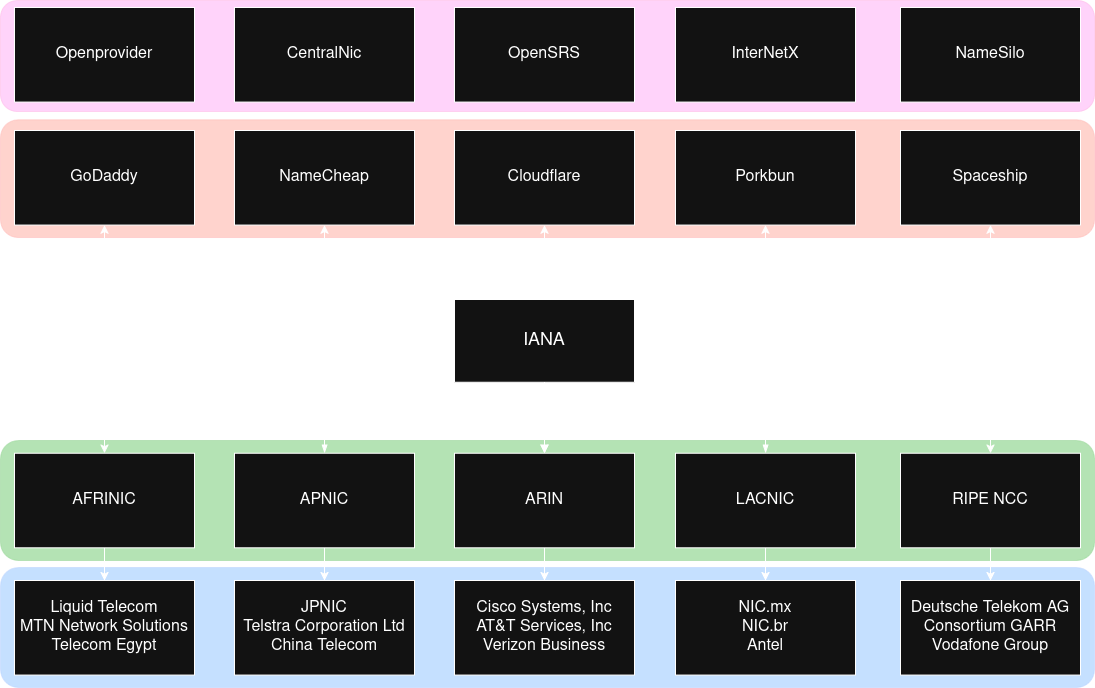
Fig. 1: Visual representation of the different components which make up the Domain Name Registration Hierarchy
The above diagram is a visual representation of the IANA responsibilities. On the top half is the registrars (red area) and the resellers (pink area). End users interact with these services in order to register domains, and the registrars handle the interaction between the registries. The bottom half of the diagram represents the 5 RIRs (green area) and some ISPs (blue area) whose IP addresses are allocated via those registries.
Traversing the DNS Tree
DNS is a decentralized database, meaning there is not one single server that maps all names to addresses. Instead, a hierarchy of many servers work together to ensure that legitimate domains map to addresses, and users are able to find those addresses. The DNS hierarchy is similar to a tree, at the top you have the root domain and its authoritative servers, then underneath the lower level domains.
The Root Domain
The root domain acts as the top level domain to the DNS hierarchy, and is represented by a dot (.). In a lot of cases the root domain is assumed, so if you are not familiar with it that would not come as a surprise. The root domain is comprised of 13 root servers (the root server system consists of 2019 servers as of this writing, see the current number of servers here) which are maintained by 12 companies.
DNS servers are pre-configured with the list of root name servers (commonly referred to as the root hints file) which are named [a-m].root-servers.net. There are 13 root servers because that is the number of IP addresses that will fit in a UDP packet (most DNS traffic happens on port 53 via UDP). Root servers contain information for all of the top-level domains, such as authoritative name servers of those domains.
Top-Level Domains
Top-Level domains (TLDs) are when we finally start getting into familiar territory. You may have heard of .com, or .org, or maybe even .io (the domain this site is hosted on, check out the search bar), these are examples of TLDs. There are several different kinds of TLDs to go over; Generic TLDs (gTLDs), Country Code TLDs (ccTLDs), and Infrastructure TLD (ARPA) will be covered on this page. There are several others that we will not go over, but the full list of top-level domains can be viewed here.
Generic Top-Level domains are managed under ICANN policies and are global, unrestricted extensions. Country Code Top-Level domains differ in that they are managed by local, national organizations and adhere to a stricter set of policies compared to the gTLDs. ccTLDs are restricted to specific countries, and some ccTLDs bypass standard registrar processing and register directly.
When root servers receive a request they send referrals, or a list of TLD servers in response to the request. If I request to go to example.com, and that hostname has not been cached (discussed later) the request will end up at the root servers, and their response will be either an error or a referral (list of servers that may have your requested domain address).
Second-Level Domains
Second-Level domains (SLDs) are the domain to the left of the TLD. In the case of an SLD within a ccTLD or other similarly constructed TLDs, the SLD is used to provide further information about the site (ie .co.uk to describe a commercial site operating in the UK, or .gov.uk to represent a government site in the UK). More commonly it represents the organization for gTLDs, for example google.com.
SLDs are required to be less than or equal to 63 characters, and the only allowed special character is the hyphen. From a marketing perspective you want the domain to be short and memorable. These domains are rented to end users for a predetermined period of time and can typically be renewed prior to expiry. SLDs must be globally unique in conjunction with the TLD.
Sub Domains
Subordinate domains (sub domains) exist within larger domains (an SLD or another Sub domain) and are used to represent either a host (eg. www) or a group of hosts (eg. staging) within the larger domain. Sub domains can also be used to specify regions/languages (ie. fr), services, etc. The owner of the domain determines how the subdomain(s) will operate and have control over everything within the TLD.
Reverse Domains
Reverse domains are special domains that exist in order to perform reverse lookups, meaning when you have an IP address and wish to get the DNS name of that address. IP addresses are read from left to right, with the upper portion representing a network, and the lower portion representing a host or group of hosts within that network. The last portion of the address (determined by the size of the network) represents the logical address of that particular host.
The reverse domain has a special name (in-addr.arpa) and sub domains are organized via IP address octets. For example, a SLD in a reverse domain may look like 127.in-addr.arpa. An important point is that IP addresses are read from left to right, whereas DNS reads names from right to left. To accomodate for DNS IP addresses are searched in the reverse, an example of the full reverse DNS name for localhost is 1.0.0.127.in-addr.arpa, keep in mind usually localhost resolves to 127.0.0.1. Reverse domains are not required, so an IP address may not resolve to a domain name.
Visual Representation of the DNS Tree
The DNS tree can be represented as a tree-shaped diagram. Every domain falls under the root domain, all subsequent domains take on the responsibility of the domains and names that fall under their respective domain. The domain is only responsible for the names within its domain and has no knowledge of domains which exist outside of its realm.
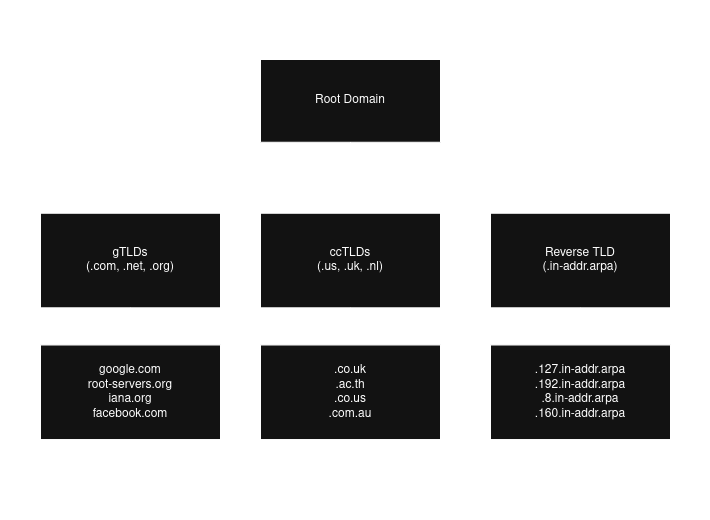
Fig. 2: DNS Tree including the root domain and subsets of TLDs and SLDs
Understanding the DNS Protocol
At the port level DNS typically operates on port UDP/53 for queries. In the case that larger responses are required (block size limit is 512 bytes), or during a zone transfer (more on this coming up) DNS can operate over port TCP/53. Encrypted DNS protocols also exist, and they must happen via TCP protocol. This section will be covering the common UDP/53 protocol that is most common when working with DNS.
DNS supports 3 types of queries: recursive, iterative and inverse queries. Inverse queries are deemed obsolete, therefore only a high level understanding will be provided now: inverse queries were used to find domain names via resource records. Recursive and iterative queries are very much relevant to modern day DNS and are covered in this section.
Domain Name Breakdown
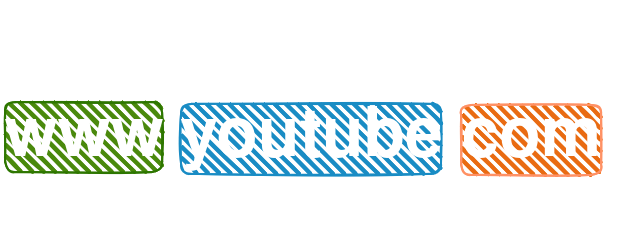
A Fully Qualified Domain Name (FQDN) is a domain name that specifies its exact location in the DNS tree. A FQDN will include the root domain, represented as a dot on the far right. In most cases this dot is invisible. The dots within the domain name act as separators, and individual sections of the domain name are referred to as labels. The TLD label with the SLD label are referred to as the zone apex. The root's label is also called the label of null. Each label within a domain name may not exceed 63 characters, and a FQDN must be equal to or less than 255 characters.
Iterative Queries
Iterative queries (also called non-recursive queries) are required to be supported on all DNS name servers.
There are 4 possible responses to an iterative query request:
- an answer including any aliases (CNAMEs) to the domain as well as whether the data is authoritative (more on CNAMEs and authoritative data later)
- an error indicating that the domain does not exist (NXDOMAIN) as well as aliases (CNAMEs) to the domain if present
- a temporary error indicating that the DNS servers are unreachable due to network issues, etc.
- a referral, which is a list of name servers to reach out to which have more information or capabilities to get the desired answer
Some DNS servers and software only support iterative queries. For example, root domain servers only support iterative queries because the high load of DNS traffic could potentially overwhelm the servers which would be disasterous for the internet. Another example is stub resolvers (client-side agents) only supporting iterative queries because handling full recursion is complex and inefficient for end-user devices.
Recursive Queries
Recursive queries will either return the answer to the request or an error, and name servers are not required to support recursive queries.
There are 3 possible responses to a recursive query request:
- an answer including any aliases (CNAMEs) to the domain as well as whether the data is authoritative (more on CNAMEs and authoritative data later)
- an error indicating that the domain does not exist (NXDOMAIN) as well as aliases (CNAMEs) to the domain if present
- a temporary error indicating that the DNS servers are unreachable due to network issues, etc.
When a DNS recursive query request is received, the DNS name server takes responsibility for resolving that request to either an answer or an error. When the name server sends an iterative query to other name servers, if the response is a referral it will choose a server from the referral to query in order to resolve the request entirely on behalf of the requesting entity.
The DNS Workflow
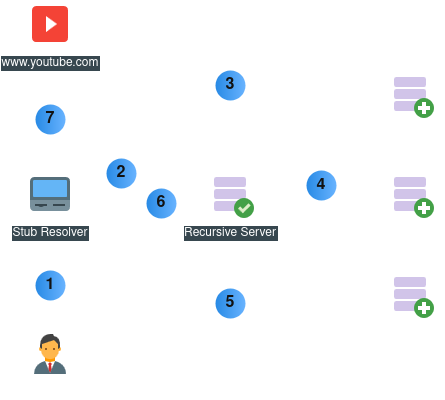
Fig. 3: Example of a DNS Name Resolution Workflow
For this example we will assume all caches are empty:
- The end-user submits a request for www.youtube.com. The stub resolver checks its cache then asks the client OS, which checks its cache and hosts file.
- The OS sends a recursive query to the DNS resolver, which checks its cache. The DNS resolver now takes responsibility for resolving that domain.
- The DNS resolver sends an iterative request to the root servers, which respond with a referral of .com TLD servers.
- The DNS resolver picks a host from the referral list and sends another iterative request. The TLD server responds with a referral of youtube.com SLD servers.
- The DNS resolver picks a host from the referral list and sends another iterative request. The SLD server responds with an answer of www.youtube.com.
- The DNS resolver then caches the answer for www.youtube.com and forwards the reply to the stub resolver on the end-user's client.
- The end-user client's OS then caches the answer and passes the data to the stub resolver (browser), which will typically cache the answer as well before initiating communication with the youtube host.
Introduction to Name Server Types
Servers can be configured to be different types in DNS, for example you can have a server that only forwards requests to other name servers, or servers that only refer name servers to other name servers. This section goes over the different types of servers and where you are likely to see them in the wild. It should be noted that DNS servers can be multiple types at the same time, and perform multiple tasks.
Primary and Secondary Name Servers
The relationship between primary and secondary servers is as follows: primary servers maintain the source of truth zone file, which contains all resource records in that zone (the next section goes over zones and resource records). Multiple primary servers for a zone can exist if zone updates are synchronized, ideally the zone file would then be mounted via NFS or by other means as to maintain consistency across the servers.
A secondary zone does not keep a source of truth zone file, but rather fetches the zone file when changes are made from the primary server. There are several ways the zone transfer can be initiated; a predetermined duration of time has passed so the secondary server reaches out for updates, the primary server can notify the secondary server via a NOTIFY message, or a manual transfer can be performed.
The previous method of updating secondary server zones was via a full zone transfer (AXFR), the newer version is via the incremental zone transfer (IFXR). IFXR only transfers data which has changed. IFXR is enabled and attempted by default, with AXFR as a fallback, both protocols operate on port TCP/53.
The primary server keeps track of the current version of the zone via a serial number in the SOA record, this will all be covered in the following Exploring a DNS Zone section. If the primary server is unreachable for a certain duration the secondary server will stop serving requests.
Caching Name Servers
Caching in DNS is used to speed up queries as well as reduce traffic over the network and load from other name servers. When a domain answer is cached, that answer comes with a TTL (time to live) that determines how long that answer can be used by the cache server. Primary and secondary servers are not excluded from caching, they can and frequently are configured to cache responses not within their zones.
DNS servers can also be configured to forward all requests to other name servers and cache the results, this setup is typically used to support stub resolvers. Things to keep in mind are that malicious attack vectors do open up when caching is enabled, such as cache poisoning, so you want to ensure security measures are in place. Also, a caching server is required to support recursion, and in the event that a caching server is reloaded or restarted, the cache will be wiped.
Forwarding Name Servers
Forwarding servers forward requests to other name servers and cache the results for local beneficiaries. These servers help decrease network traffic as well as load on the DNS name servers responsible for resolving the answers. Forwarding servers can also be used to ease maintenance and delegate configuration changes / zone maintenance to outside sources.
Authoritative-only Name Servers
Authoritative-only servers are not capable of caching data and provide authoritative-only answers to queries. Authoritative answers mean the data comes directly from a primary or secondary server as opposed to a cache. Authoritative-only servers are typically used in 2 scenarios: providing perimeter security in a DMZ, and to provide high-performance for the servers. Examples of authoritative-only servers include the root servers, the TLD servers, and servers that provide names for high volume sites.
Exploring the DNS Zone
Zone files contain all the data for the zone. Zone files are made up of 3 types of entries. There are comments (comments begin with a semicolon), directives (used to control processing of zone files and act as global variables, begin with the dollar sign) and resource records (define resources in a domain, are usually single line but can be multiline with the use of parenthesis).
As of this writing in 2026 there are approximately 90 resource record types. This section will not cover all of them, but it will go over the most relevant records. This page will also cover 2 directives that are commonly used.
ORIGIN & TTL Directives
The ORIGIN directive is used to set the base domain globally. When resource records do not apply the full domain, the ORIGIN is appended to complete the domain. This significantly decreases the amount of text necessary in a zone file. An example ORIGIN would look like this $ORIGIN example.com.. The ORIGIN is typically defined at the top of the zone file, if ORIGIN is defined a second time, all records defined after that point will use the second ORIGIN value. If a user provides a FQDN with the root dot appended at the end, the ORIGIN value is not appended to the value.
The TTL directive is used to set a global TTL. TTLs are provided with DNS resource records to tell caching servers how long that record is to be cached for, and TTLs are provided with every resource record. When the TTL directive is set it allows users to specify a TTL for every record globally, the TTL can be overridden for individual resource records when a TTL is added directly An example TTL would look like this $TTL 300. TTLs are defined in seconds, for stable records (not changing frequently) a value of 1 hour - 1 day (3600 to 86400) is recommended, and for active changes or migrations 5 - 10 minutes (300 to 600).
The Start of Authority Record
The Start of Authority (SOA) record must be the first resource record defined in a zone, and describes global characteristics of the zone. It is typical to see the SOA resource record span multiple lines with the use of parenthesis for the ease of reading and the lengthy list of values that are provided.
The SOA resource record syntax is as follows:
- name: typically represented with the @ symbol, which is equivalent to the defined ORIGIN directive which is set to example.com. The name identifies the zone.
- ttl: when the global TTL directive is used, this field if left blank will take the TTL directive value. As discussed the TTL defines the record's life span.
- class: there are several class types, class IN is used over 99% of the time. It is the default class and stands for Internet.
- rr: specifies the type of record, in this case rr will be set to SOA since this is an SOA resource record.
- name server: referred to as MNAME, this value specifies the primary name server of the zone. The primary name server will still need a NS record.
- email: referred to as RNAME, this value provides an email of the administrator, but replaces the usual @ symbol with a period.
- serial number: defines current version of zone file, when changes are made this value must be increased for changes to be propogated. A popular method is to set the version to the current date with 2 00's at the end, those 2 0's act as the incremental change numbers. An example if setting the serial number on April 30, 2026: 2026043000.
- refresh: defines when a secondary server will query the zone holder for updates, typically 3 to 24 hours. hours can be specified with the preceeded h, such as 3h for 3 hours.
- retry: if a secondary server queries for zone updates at the refresh time and the primary server is unreachable this value determines the time to wait between retries, typically 10 - 60 minutes. Minutes can be specified with the preceeding m, such as 10m for 10 minutes.
- expiry: specifies the amount of time refresh and retry values are able to fail before the primary server is no longer considered authoritative. When a connection is made refresh and retyr values are reset. Typically this is set to 1 - 3 weeks, weeks can be specified with a preceeding w, such as 3w.
- minimum: when a domain is requested and there is no answer for that domain (NXDOMAIN), this value determines how long to return the NXDOMAIN status, typically 0 - 3 hours (3h).
@   IN  SOA     ns1.example.com.    admin.example.com. (
                2026043000 ; serial number (must be incremented when zone is changed)
                3h         ; refresh time
                15m        ; retry time
                3w         ; expiry time
                3h         ; minimum time
                )
NS & MX Records
Name Server (NS) records define the authoritative name servers in this domain (primary or secondary name servers). A minimum of 2 name servers are recommended per zone, and if a server is added which is not authoritative to the zone this can result in failed lookups or slow resolution to queries (also referred to as lame delegation).
The NS record syntax is as follows:
- owner: typically left blank and the ORIGIN directive is applied automatically, the owner is the base domain.
- ttl: when the global TTL directive is used, this field if left blank will take the TTL directive value. As discussed the TTL defines the record's life span.
- class: there are several class types, class IN is used over 99% of the time. It is the default class and stands for Internet.
- rr: specifies the type of record, in this case rr will be set to NS since this is an NS resource record.
- name: name of the name server, either the FQDN with the root dot, or just the hostname and the ORIGIN is appended to the hostname.
    IN  NS     ns1
    IN  NS     ns2.example.net.
Mail Server (MX) records define the mail servers for your domain. DNS informs external parties where to direct their mail based on these records, and records allow for redundancy, load balancing and security for emails. MX records have a preference number, when all MX records have the same preference number DNS acts as a load balancer. When preference numbers are different, the lower preference number takes a higher presedence number.
The MX record syntax is as follows:
- owner: typically left blank and the ORIGIN directive is applied automatically, the owner is the base domain.
- ttl: when the global TTL directive is used, this field if left blank will take the TTL directive value. As discussed the TTL defines the record's life span.
- class: there are several class types, class IN is used over 99% of the time. It is the default class and stands for Internet.
- rr: specifies the type of record, in this case rr will be set to MX since this is an MX resource record.
- preference: specifies the order of presedence when multiple mail servers are added, with the lower value taking precedence
- name: name of the mail server, either the FQDN with the root dot, or just the hostname and the ORIGIN is appended to the hostname.
    IN  MX  10   mail1.example.com.
    IN  MX  20   mail2
A & AAAA Records
Address (A/AAAA) records map a domain name to an IP address, IPv4 for A records and IPv6 for AAAA records. A single domain name can be mapped to multiple addresses, and DNS will load balance between the IP's. Possible load balancing options are round-robin and random.
The A/AAAA record syntax is as follows:
- name: describes the desired name to be mapped to an address. The FQDN can be applied with the preceeding root dot, or the ORIGIN directive will be automatically appended.
- ttl: when the global TTL directive is used, this field if left blank will take the TTL directive value. As discussed the TTL defines the record's life span.
- class: there are several class types, class IN is used over 99% of the time. It is the default class and stands for Internet.
- rr: specifies the type of record, in this case rr will be set to A or AAAA since this is an A or AAAA resource record.
- address: the address is an IP address, IPv4 for A records and IPv6 for AAAA records.
; name servers
ns1.example.com. IN   AAAA    2001:db8:0:1::100
ns2              IN   AAAA    2001:db8:0:1::101

; mail servers
mail1    IN  A     192.168.122.11
mail2    IN  A     192.168.122.12

; blog servers
blog     IN  A     192.168.122.30
blog     IN  A     192.168.122.31
blog     IN  A     192.168.122.32

; web servers
www      IN  A     192.168.122.40
         IN  A     192.168.122.41
         IN  A     192.168.122.42
CNAME & TXT Records
Canonical Name (CNAME) resource records map names to other names. CNAME resource records should not be used with NS or MX records because it violates DNS standards (RFCs), causes conflicts, and disrupts email delivery and zone delegation. CNAME records help with management; while multiple A records can be used, with CNAMEs the configuration changes required is reduced as the CNAME maps to the A record name. CNAME records are mandatory in 2 situations: to reference a domain that is external to this zone, and when adding the www subdomain to a website.
CNAMe resource records can produce more workload on the server since CNAMEs are included in the answer, and could potentially exceed the UDP packet size (512 bytes). This would result in slower performance as a TCP connection would then need to be established for every answer. CNAMEs should not point to other CNAMEs as this will significantly decrease performance, this is referred to as CNAME chaining.
The CNAME record syntax is as follows:
- alias-name: describes the desired name to be mapped to an existing domain. The FQDN can be applied with the preceeding root dot, or the ORIGIN directive will be automatically appended.
- ttl: when the global TTL directive is used, this field if left blank will take the TTL directive value. As discussed the TTL defines the record's life span.
- class: there are several class types, class IN is used over 99% of the time. It is the default class and stands for Internet.
- rr: specifies the type of record, in this case rr will be set to CNAME since this is a CNAME resource record.
- canonical-name: the existing name that this record will be an alias of.
www    IN  CNAME  example.com.
web    IN  CNAME  example.com.
Text (TXT) records have historically been used to provide the ability to associate human-readable text with a host or domain within DNS. It is typically used to verify ownership, if you request services relating to the domain from third parties they will typically provide text for you to include in a TXT record, once that text is added they can ensure you are the proper owner of the domain.
There are several use cases where TXT records are used, a few examples are: verifying site ownership to Google Search Console to monitor SEO performance and status, configuring SPF and DKIM for mail authentication checks, and enforcing DMARC to provide a policy to follow in the case emails fail the authentication checks.
The TXT record syntax is as follows:
- name: describes the desired domain where this TXT record will be reachable at.
- ttl: when the global TTL directive is used, this field if left blank will take the TTL directive value. As discussed the TTL defines the record's life span.
- class: there are several class types, class IN is used over 99% of the time. It is the default class and stands for Internet.
- rr: specifies the type of record, in this case rr will be set to TXT since this is a TXT resource record.
- text: the text string to be added as the answer to the TXT record.
example.com. IN  TXT  "google-site-verification=1234567890987654321"
_dmarc       IN  TXT  "v=DMARC1; p=none; rua=mailto:admin@example.com; ruf=mailto:admin@example.com; sp=none; adkim=r; aspf=r"
PTR Records
Pointer (PTR) records are the reverse of A/AAAA records. They are used to map IP addresses to domain names, and are different than other records in that they exist under a separate domain. As discussed earlier in the reverse zones section, there is the special Top-Level domain known as IN-ADDR.ARPA. This domain contains a tree of records for IP addresses, separated by the octets in an address. Only one IP address can map to one domain name, unlike A/AAAA records and CNAME records.
The way IP addresses are handled in DNS when working with PTR records is the address is reversed, and the subnetting of the network will determine the domain. For example, if the network is "192.168.100.0/24", there will be 253 possible addresses within that network (excluding network ID or 0 and broadcast or 255). The /24 subnet tells us that the first 3 octets are immutable, therefore we can add all 3 octets to the ORIGIN directive and simply map the last octet to a domain name. A FQDN based on the example could look like this: 1.100.168.192.IN-ADDR.ARPA. IN PTR www.example.com, note how the IP address was reversed, since DNS reads domains from right to left.
PTR records are different from other records in that they require their own zone, below is an example of a reverse zone file. In the case that you are working with a larger network, say a /16 subnet, you can then remove the third octet from the domain to allow for more records, in the above example you would remove the 100. domain from the ORIGIN directive and provide 2 octets when adding names to the PTR records.
The PTR record syntax is as follows:
- name: describes the FQDN of the address within the IN-ADDR.ARPA reverse zone.
- ttl: when the global TTL directive is used, this field if left blank will take the TTL directive value. As discussed the TTL defines the record's life span.
- class: there are several class types, class IN is used over 99% of the time. It is the default class and stands for Internet.
- rr: specifies the type of record, in this case rr will be set to PTR since this is a PTR resource record.
- rdata: specifies the name the address will be mapped to. A PTR record must uniquely map one address to one domain name.
$TTL    86400
$ORIGIN 1.168.192.in-addr.arpa.

@       IN      SOA     ns1.example.com. admin.example.com. (
                              2026050301 ; Serial (YYYYMMDDNN)
                                   86400 ; Refresh (1 day)
                                    7200 ; Retry (2 hours)
                                 3600000 ; Expire (41 days)
                                   86400 ; Minimum TTL (1 day)
                              )

@       IN      NS      ns1.example.com.
@       IN      NS      ns2.example.com.

10      IN      PTR     ns1.example.com.
20      IN      PTR     www.example.com.
30      IN      PTR     mail.example.com.